
BirOtel · For hotels in Azerbaijan
Connected records from booking to check-out
Record bookings received by phone, message or other sources in BirOtel. Reception can follow guest details, stay dates, rooms and accounts in the same system, while management sees the hotel’s daily activity.
14-day free trial · App interface in Azerbaijani and English
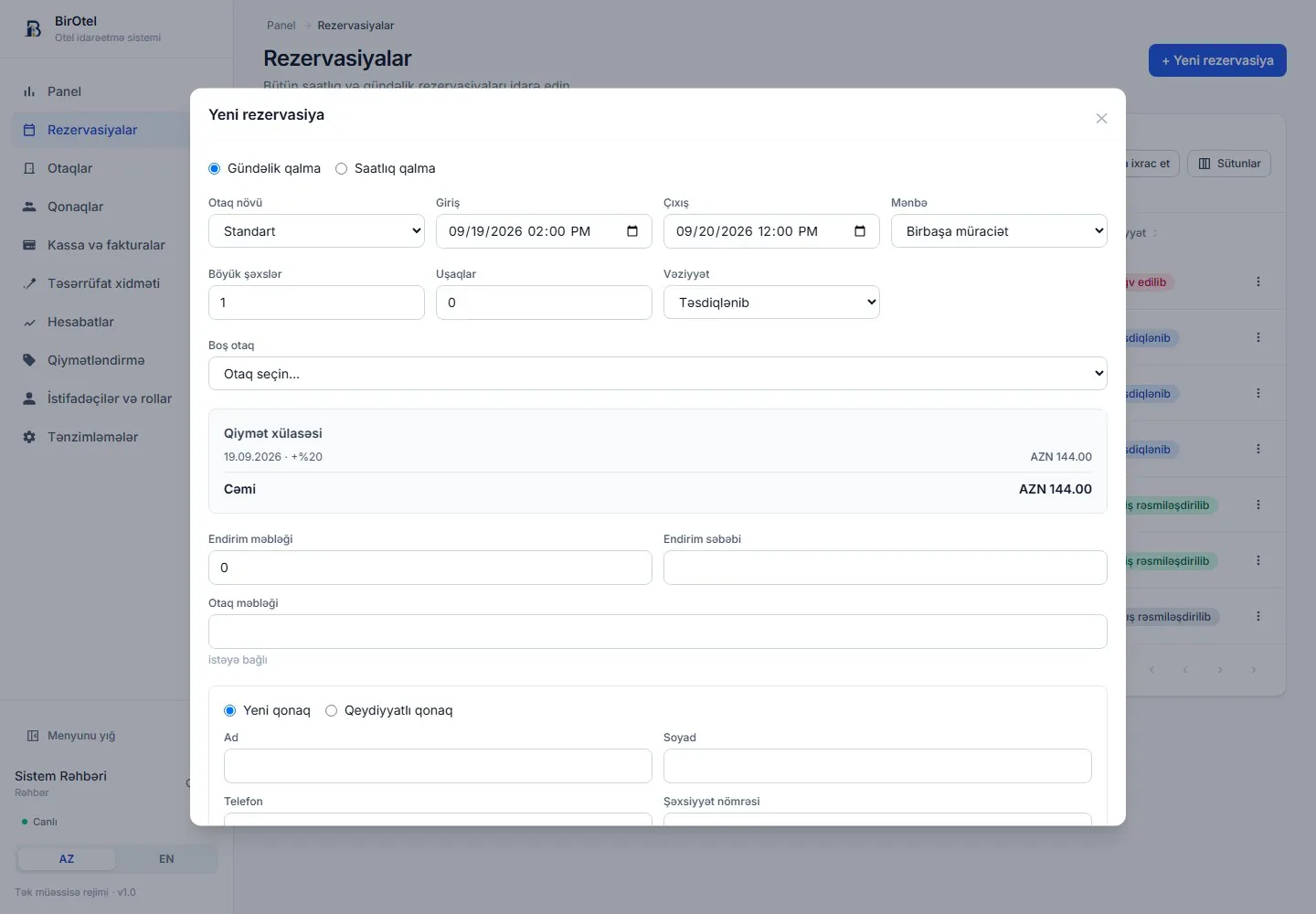
Keep booking details together
The reservation workflow starts with the source of the booking. BirOtel records the guest, dates, room type, guest count and source. You can select an existing guest or create a new record. Subsequent charges and payments remain linked to that booking.
- Choose a nightly or hourly stay.
- Link an existing guest record to the booking.
- Review the room selection and calculated price when creating the booking.
Manage seasonal and weekend rates
Your hotel’s base rate may not apply to every date. The pricing module supports rules for weekends, holidays, seasonal periods and hourly packages. The rate calendar shows the calculated price for the selected room type and date.
- Prepare pricing rules before accepting bookings.
- See how surcharges and discounts affect the total.
- Apply pricing rules suited to different stay types.
Connect the booking to the stay and payment
Accepting a booking is only the first step. On arrival, staff register the guest and assign a room; during the stay, they add services to the account. Reception can track partial payments and the outstanding balance, then close and print the invoice at check-out.
- Track today’s arrivals and departures on the dashboard.
- View accommodation charges and extra services on one account.
- Follow room cleaning and readiness after check-out.
A practical workflow
Three stages of a booking
- 1
Create the booking
Select the guest, stay type, dates and suitable room. Review the price summary and record the reservation.
- 2
Manage the stay
Confirm the room assignment at check-in. Add services and payment records to the booking account throughout the stay.
- 3
Complete check-out
Check the outstanding balance, settle the account and print the invoice. Track preparation of the room for the next guest.
Before you decide
Frequently asked questions
Are Booking.com reservations imported automatically?
The current version focuses on internal hotel operations and does not provide automatic synchronization with Booking.com or other sales channels. You can enter bookings received from those channels into the system. Specific integration requirements are discussed separately.
Do hourly stays require a separate application?
No. BirOtel supports both nightly and hourly stays. Pricing rules for hourly packages are configured in the pricing module.
Is the reservation module charged separately?
Reservations are part of the core modules included in every standard plan. Plans are based on managed rooms and active users; there is no extra charge per booking record.
The next step for your hotel
See your reservation workflow in a live demo
Introductory plans start at 59 AZN/month. Standard hosting, updates and technical support during business hours are included. Prices exclude VAT; optional initial setup is charged separately.