
BirOtel · For hotels in Azerbaijan
Manage your tour agency partnerships in one system
Guests who arrive through a tour agency should receive the agreed rate on every booking, applied the same way each time. BirOtel’s Tour agencies module stores your contract terms, calculates the discount automatically when a booking is made and shows what each agency brings to your hotel.
14-day free trial · App interface in Azerbaijani and English
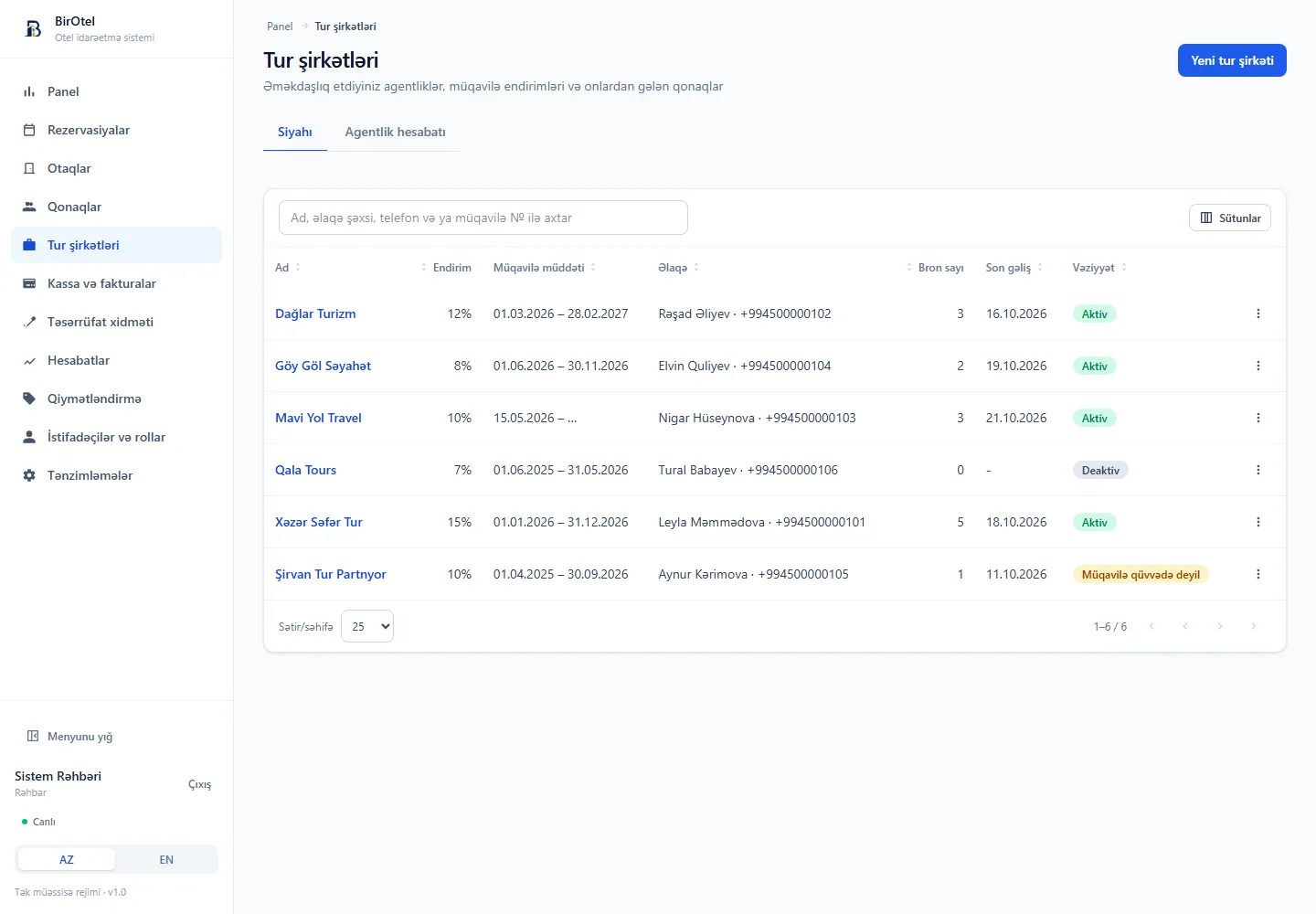
Every agency’s contract terms on one record
When discount rates live in a separate spreadsheet and contracts sit in a folder, reception has to check which terms apply every time. The module stores each agency’s contact person, phone, email, tax ID, contract number, start and end dates, discount rate and notes. You can find an agency by name, contact person, phone or contract number.
- Record the contract period with start and end dates, or leave it open-ended.
- Choose whether the discount also applies to hourly stays.
- Deactivate an agency when the partnership ends — past bookings and history are kept.
The discount is calculated on the booking automatically
When a tour agency is selected in the reservation form, the contract discount is applied to the room rate — the room charge and the extra guest charge — automatically. Tax is calculated on the discounted amount, and the booking source is recorded as “Agency”. If the arrival date falls outside the contract period, or the discount does not cover hourly stays, the system does not apply it and explains why in the price summary.
- The discount rate is stored on the booking, so later contract changes do not reprice existing bookings.
- Inactive agencies cannot be selected for new bookings, so outdated terms are not applied by mistake.
- Assigning or changing a booking’s agency is written to the financial audit log.
See what each agency brings, in numbers
For the selected period, the agency report shows bookings, guests, room nights, accommodation revenue excluding tax, the discount given and the total including tax for each tour agency. Bookings are counted by arrival date; cancelled bookings and no-shows are excluded. You can also open the list of guests each agency has brought.
- Filter the reservation list by agency and export it to Excel with an “Agency” column.
- The agency name appears in guest history and in the dashboard lists.
- Grant view, create, edit and delete permissions for the module separately by role.
A practical workflow
Working with a tour agency in three steps
- 1
Add the agency
Enter the discount rate, contract number and validity period from the contract. Keep the contact person and tax ID on the same record.
- 2
Select it on the booking
Choose the tour agency in the reservation form. The discount and the total appear in the price summary straight away.
- 3
Review results by period
Compare bookings, guests, room nights and the discount given in the agency report. Use these figures when you renegotiate contract terms.
Before you decide
Frequently asked questions
Is the Tour agencies module charged separately?
No. It is one of the core modules included in every standard plan. There is no extra charge based on the number of agencies or agency bookings.
Can a tour agency log in and make bookings itself?
The current version has no separate agency login or online booking portal. Hotel staff record bookings received from tour agencies, and the contract discount is applied automatically.
Are agency commissions and settlements tracked?
The module manages the contract discount — the agreed rate applied to the guest. Commission paid to the agency and settlements with the agency are not provided as separate accounting. If you need this, let’s discuss your process during the demo.
The next step for your hotel
See your tour agency workflow in a live demo
Introductory plans start at 59 AZN/month. Standard hosting, updates and technical support during business hours are included. Prices exclude VAT; optional initial setup is charged separately.